Workflow, Collaboration, Enterprise Content Management

Monkey Fun with Exchange Server 2007

by John Holliday 22. May 2009 05:59

Ever try to rename a server with Exchange 2007 installed?  Don't even think about it!

After spending the good part of a day setting up a nice clean MOSS development VM (W2K3x64/VS2008/Office), I decided to add Exchange Server 2007 to the mix just to play with managed folders and the most excellent Messaging Records Management (MRM) support layer.  

Got everything installed and configured.  So far so good. Then got around to configuring email in MOSS and decided the server name needed to be changed because of a conflict with another server that I'll typically have running all the time.  Shouldn't be so bad, right? 

  • WRONG!  Renaming the server breaks Exchange monkey-bad.  Ok, so I should've seen that one coming.  No problem, I'll just uninstall and reinstall Exchange, right?

  • WRONG! Exchange can't be uninstalled after a rename because the setup program is also dependent on the name that was used when it was first installed.  Arrrrrgh!  Ok, no problem. I'll just rename the server back to the original name, uninstall and reinstall Exchange, then rename it again, right?

  • WRONG!  The temporary rename hosed the setup PREREQUISITES configuration, which the setup program uses during the uninstallation process.  If the prerequisites fail for any reason, then it CANCELS the uninstall of any remaining components, including the Mailbox Server Role, which is the main one that has to be removed!  

Like I said - monkey bad! Can't recover.  Can't uninstall.  Can't rename even to the original name.  Can't use MOSS, because it's now hosed as well.  

Nothing good can come of this, so I'm starting over again from scratch. This time, with Exchange Server 2007 in its own private cage since it can't seem to play nice with the other primates.

Call me silly, but was this really necessary?  

Fool me once, shame on me, right?  

Wrong!  It shouldn't be this hard.

Microsoft SharePoint Server 2010

by John Holliday 16. April 2009 13:49

SharePoint 2010

You've probably heard by now that the next version of SharePoint will drop the "Office" moniker in favor of the more direct and easily understandable "Microsoft SharePoint Server 2010"  (read the Microsoft SharePoint Team Blog Post).  I agree with my colleague Bil Simser that it sounds like something from a science fiction novel (2010 The Year We Make Contact).  On the other hand, I see the logic.  It's just like all the other software titles from Microsoft that continually evolve to meet the changing needs of users.  Office 2003.  Exchange Server 2007.  SharePoint Server 2010.  Join the club, eh?

Sure there's the implied shift away from the whole "Office Business Applications" (OBA) theme, where the line between client and server components was blurred in favor of the more holistic "Office System" approach.  I can live with that.  I'm not sure it's taking hold anyway - at least not for the developers I've talked to.  Most of the SharePoint developers I know who come from an ASP.NET background seem to have trouble thinking of themselves as Office developers.

And sure, there's the potential confusion between Windows SharePoint Services (now "Microsoft SharePoint 2010") and the new server version of the product.  But maybe that's a good thing.  According to Tom Rizzo, we should just refer to it as "SharePoint" and stop stressing over the licensing model anyway.

And what about the "12 Hive"?  Will there be a "2010" folder to contend with now?  Will it change to "14" maybe?  And how about the namespaces, like "Microsoft.Office.RecordsManagement.InformationPolicy"?  Will they change?  I doubt it.  Something to think about, though, as you plan your next SharePoint project.

I dunno.  I'm with Rizzo.  I don't think the name really matters that much.  After all, we are in the middle of a content explosion.  The paradigm IS continually shifting.  Maybe we need a more generic name so we can focus more on the solutions we build and less on the particular features of a particular product version.

Oh, wait!  "Feature".  My bad.  We were talking about SharePoint features, not SharePoint Features.

This is soooo much fun!

SharePoint Designer 2007 - It's FREE!

by John Holliday 2. April 2009 05:10

In case you haven't heard, Microsoft Office SharePoint Designer 2007 is now available as a FREE download.  This is an exciting development, because it means that a lot more developers will now be able to customize their SharePoint deployments to include all the functionality they need.

Fellow SharePoint MVP Asif Rehmani has written a thorough analysis of this change in direction by Microsoft and it's impact on the SharePoint community, particularly for design professionals.  Check it out.

MOSSMAN Says: New SharePoint Themes Available

by John Holliday 19. March 2009 15:17

In case you missed it, the term "SharePoint Designer" applies not only to the software produced by Microsoft to customize SharePoint sites.  It also applies to a friend of mine, Randy Drisgill AKA the "Mossman".  He's got a great blog with useful tips and tricks for customizing the look and feel of SharePoint (not to mention the "Professional SharePoint 2007 Design" book he did with my other friends David Drinkwine and Coskun Cavusoglu).

Anyway, check out Randy's latest post about the 10 new SharePoint themes that Microsoft released today.  I haven't played with them yet, but some of them look pretty good. 

SharePoint Best Practices Conference Coming to London

by John Holliday 14. March 2009 05:24

bestPracticesLogo SharePoint training provider Combined Knowledge will host the first European SharePoint Best Practices conference in London April 6-8, 2009.  Microsoft veteran Joel Oleson will deliver the keynote and the speakers list reads like a "who's who" of the top SharePoint experts, MVPs and Microsoft product team members. 

I'll be presenting a session on designing and building records repositories using the powerful records management features provided by Office SharePoint Server.  I'm pretty excited about it, since this will be my first trip to London.  The conference will be held at the Queen Elizabeth II Conference Centre, which is right in the middle of all the London sights, so I'll be sure to stay busy before and after my talk! :)

Hope to see you there.

Microsoft to Provide Job Skills Training to "Elevate America"

by John Holliday 27. February 2009 04:04

The thing about working with a team is that sense of being part of something greater than we are.  With the current state of the economy, and with so many people and companies shifting into survival mode, it's really encouraging to see a large company taking on a greater responsibility to the community. 

Today I learned that Microsoft is joining forces with state and local governments to attack the problem of technical education by providing up to 2 million workers with access to free and low cost training resources to help them prepare for jobs in the global market.  The "Elevate America" program is apparently not new - just new to me.  There are already lots of non-profits that have received grants to help them deliver the training.  It seems like a great idea, and I'm looking forward to finding out more about how effective it is.

Technorati Tags:

SharePoint Conference 2009 Announced

by John Holliday 3. February 2009 03:04

spconference2009 Mark you calendars!  Microsoft has announced the SharePoint Conference 2009, which is scheduled for October 19-22 in Las Vegas.  This promises to be a very exciting conference because it will be packed with information about the next version of SharePoint, codenamed SharePoint "14", while at the same time including real-world guidance for the current version. 

This is one conference that is not to be missed - so you'll definitely see me there.  (BTW, this will be my first time in Vegas, so any tips you have for what to do (and what NOT to do) will be most welcome!)

Early bird registration is available here

Feed your CAML some IntelliSense so it doesn't bite you in the you-know-what!

by John Holliday 18. January 2009 22:44

camldotnet_80x80 As every SharePoint developer knows, the CAML is an ornery beast.  Get too close - it'll spit at you, and as soon as you get knee-deep in the hot sands of SharePoint-land, it's just a matter of time before it bites you in the ass!

But wait!  There's hope for all you erstwhile CAML-geeks!

Announcing the CAML.NET IntelliSense project

I've added a new component to the CAML.NET toolset that aims to help you tame that sometimes finicky, but ever-popular and oh-so-useful CAML language.

Click here to download the CAML.NET.Intellisense installer.

You probably already know how to add the SharePoint schemas to Visual Studio so you get IntelliSense when editing CAML files.  If not, here's a link to a great article by my friend Andrew Connell that walks you through the procedure.

This is a good first step, but we can take it even further by copying the core schema files and then extending them so they provide more information.  Specifically, we can add the detailed guidance from the SDK that is scattered all over the Internet and that developers seem to have a hard time finding. 

Let's face it - even with an up to date set of bookmarks, who wants to go searching all over the place for that missing tidbit that tells you just what that obscure attribute is for when you're right in the middle of building the CAML for your feature?  If you're like me, this quickly becomes a major distraction.  Hard enough to stay focused in the first place!

Using Annotated Schemas

The main idea behind the CAML.NET IntelliSense project is to extend the core schemas in two ways:

  1. Gather as much information as possible about each element and attribute and place it into xs:annotation elements so that it pops up in context while editing; and
  2. Identify and replace as many xs:string types as possible with enumerated types so the valid values for each attribute also popup in context while editing.

For example, using the core WSS schemas directly, we get a drop-down like the following while editing a Field element:

PlainSchema

That's better than nothing, but it doesn't say what the attribute is for, so unless we're already familiar with it, we have to refer back to the SDK either online or in the CHM file.  On the other hand, using the enhanced annotated WSS schema, we can provide more information in context.  We only need to refer to the SDK documentation when we really need it.  Most of the time, we just need a hint, which is what Intellisense is all about, right?

EnhancedSchema

Extending the Core Schemas with Enumerated Types

In addition to annotating the schemas with the corresponding SDK documentation for each element, we can go one step further and change the plain vanilla xs:string types to custom enumerated types so we get the list of valid choices for the attribute values.  This comes in very handy and also helps to eliminate those nasty little typos that can be *really* hard to find (and the CAML gets mighty snippy about).

There are lots of places in the SDK documentation where the expected attribute values are listed in the description, but are not enumerated in the schema.  This again means that we have to go digging through the documentation to discover what SharePoint expects the attribute values to be.  This can be an enormous waste of time - even if you have a pretty good idea of what the values are.  Who can keep all that detail in their head?

So, I've tried to find and enumerate as many attribute values as I could so they are available at your fingertips when you need them.  Each enumeration is also annotated, so you get contextual help for the available values as shown below.

CamlIntellisense

Here's another example that shows the enumeration of list template types when adding a ListInstance element to a feature.  This is a biggie.  How many times have you had to hunt down the table of list template type identifiers?

ListTemplateTypeEnum

Installing the Enhanced Schemas

The CAML.NET IntelliSense download package includes an MSI installer that copies the extended schemas into the local Visual Studio schema cache, so all you have to do is run the installer and then close and re-open Visual Studio.  The current version handles both Visual Studio 2005 and 2008.

Note: If you're already using the wss.xsd schema from the 12 hive, you should remove the previous catalog file from the Visual Studio schema cache.  You may also have to fiddle with your IDE settings a bit because Visual Studio somehow remembers the previous schema settings and adds both the old and the new schemas for files that have already been edited, event after you have removed the old catalog file.  This can interfere with the new catalog file you've just installed.  In the worst case, you will have to choose "don't use this schema" from the "schemas" dialog for files you have already started editing.

As you can imagine, there are a LOT of elements and attributes to deal with.  I've made a pretty good start at addressing the most frequently used items, and I'll continue to add more annotations as my schedule permits.  If you find missing or incorrect annotations, please drop me a line or leave a comment and I'll update the schema. 

Now you can ride that CAML high in the saddle and head on out to the SharePoint.  You know - the oasis?  Right next to the 12 hive!  See you there!

"The camel has a single hump,
The dromedary two;
Or else the other way around,
I'm never sure.  Are you?"

- Ogden Nash

Stay tuned for CAML.NET 2.0!

"SharePoint Saturday" - What a Great Idea!

by John Holliday 16. January 2009 04:35

Last week I had the privilege of speaking at the SharePoint Saturday event in Virginia Beach.  I talked about the upcoming release of CAML.NET 2.0, and I did a session on records management in MOSS.  The turnout was very good, with people coming in from all directions - some to speak, some to listen - but everyone came away with a very positive experience.

First of all, it was held at the brand-spanking new Advanced Technology Center at Tidewater Community College in Virginia Beach, which is kind of an interesting story.  It's actually part of the Virginia Beach public school system - an innovative approach to providing high school students with literally everything they need for all things geeky!

The list of speakers was impressive, and I've got to hand it to Susan Lennon and the other organizers, who did an amazing job their first time out.  Becky Isserman (who is coming to Jacksonville to speak at our next JOG meeting next month!) gave a great talk on using Silverlight in SharePoint.  Todd Bleeker was there and they had to arrange a special room just for Joel Oleson because of the large turnout.  Joel's talks were very interesting and provided everyone with a unique perspective on SharePoint Governance and strategies for migrating to SharePoint.

You can download my records management slides from here.

This "SharePoint Saturday" idea is picking up steam around the country.  There is another one scheduled for New York and probably more to come throughout the year.  It's kind of like a code camp just for SharePoint.  I'm looking forward to participating in more of them.  If there's one happening in your area, then I highly recommend it.

Stay tuned.

A Special Tribute to Albert Einstein - The Father of ECM

by John Holliday 27. December 2008 14:17

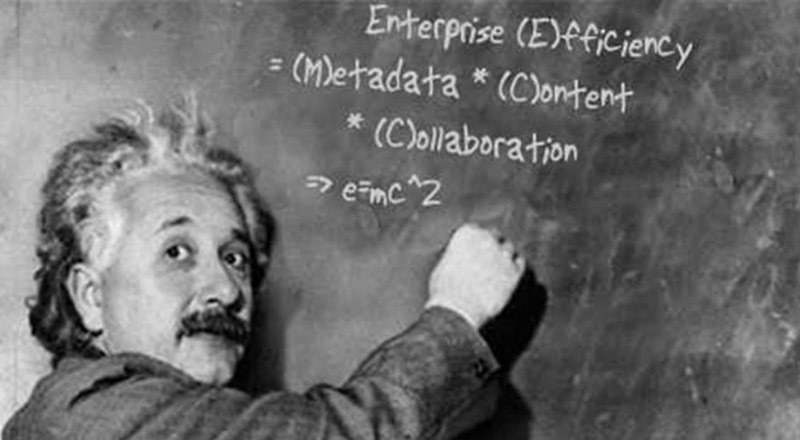
E=MC^2 is probably the most famous equation in modern science, but little is known about its true origins. At least I didn’t know much about it until very recently. Of course, I understood, like everyone else, that it was formulated as part of professor Einstein's General Theory of Relativity, but I never really thought about it much beyond what we learned in school. It was not until I started digging into my own personal genealogy that I stumbled across something that shed some light on what had remained, until now, a mystery.

I had often wondered why Professor Einstein chose to express his now famous equation using those particular letters, E=MC^2.  Was it just pure coincidence that we’re now using those very same letters to describe a business problem that threatens the very fabric of modern-day society? Indeed, where would we be today without some form of Enterprise Content Management (ECM) system?

Following the war, there wasn’t a lot of work for singers in Harlem, so my distant cousin, Billie (on my father's side, four times removed), would supplement her income by filling in as a part-time assistant for the professor at his office in Princeton. While rummaging around in the attic of our old house, I recently came across a box of her personal items. In it, there was a diary that she kept during the years between 1947 and 1952, after her divorce from Jimmy Monroe.

With the cold war still in full swing, it seems that the professor was literally swamped with letters and packages arriving daily from nearly every corner of the globe containing white papers and pamphlets on a myriad of subjects ranging from Newtonian physics to quantum field theory. Keeping track of all that content often proved too much for the professor as he became increasingly frustrated while developing his unified field theory. In one entry, my cousin writes:

“E. was really upset today. The poor man just can’t keep track of all the information that keeps streaming into the office. I try my best to organize it all, but there’s just too much of it.”

More telling is the entry from March 15th, 1951 - the day after the professor's 72nd birthday.

“I overheard E. shouting at one of his students just as I was coming into the office today. ‘Why so difficult to separate ze metadata from ze content?! Teilen-Punkt! Teilen-Punkt! If only we had ein Teilen-Punkt!’ I wish I knew what he was talking about, so I could help him find it.  He really is starting to worry me.“

I found this entry particularly intriguing; because it seems to capture the essence of the same problem many of us are facing today. Managing enterprise content is quickly becoming one of the most important fields of study in the information age – especially the problem of dealing with metadata. Could it be that Einstein perceived a solution to this problem way back in the 1950’s?

I kept digging through the box and came across lots of interesting stuff. There were photos of Billie on the road with Duke. Billie back-stage with a guy that looks like Miles and sharing a laugh with other hard-core musician types. But the real shocker was a small photo that was stuck to the side of the box with a piece of masking tape.  I almost missed it.  On the back there was one legible sentence scribbled in pencil along the edge so faint I could barely make it out. “Don’t ignore ze metadata. It is ze content. Without it, zer can be no Teilen-Punkt.”  I was still trying to comprehend what I was reading, and then I turned the picture over.  There, before my eyes, was the answer - scrawled on the chalkboard right behind him.


Einstein Photo

Was ECM part of Einstein’s grand vision of the unified field? Is metadata somehow connected with the theory of relativity? Are you buying any of this?  We know now that content management is at the heart all business processes.  Is it possible that the father of modern scientific thought was also focused squarely on solving this most perplexing problem of modern day society – namely, how do we deal with content overload without interfering with day-to-day productivity?

One can only imagine what might have happened had SharePoint been available in Einstein’s day. Teilen-Punkt.  Alas, all we can do now is speculate, and pay tribute to a wonderfully creative and brilliant mind. A true visionary – in many ways, the father of ECM.

All content is relative.  Teilen-Punkt, indeed!

Get Adobe Flash Player

John Holliday

Independent author, consultant, trainer, and software developer specializing in enterprise content management, collaboration, workflow and business process automation.

MVP Profile SharePoint training for developers and administrators

Developer Resources

  • Fields WSS XSLT - Custom XSLT stylesheet that displays the default SharePoint column definitions in a table.
  • Custom Action Identifiers - A sortable table of default field definitions, including CAML declarations for writing content types.
  • CAML.NET Documentation - Online documentation for the CAML.NET class library.