Copilot in SharePoint, Records Management, and the Prompt that Renames Four Thousand Files
Last November I proved that AI prompts are not records. Microsoft has now taught them to act.

– 13 min read

Last November I proved that AI prompts are not records. Microsoft has now taught them to act.

The webinar invitation arrived this week: Automating Content in SharePoint with Copilot: Agents, Skills, and Autofill. The pitch is that SharePoint has been quietly doing AI since Syntex in 2020, and now it can do the boring parts for you: tagging, extracting, summarizing, routing. A site Agent that runs a whole workflow. A Skill you write once and reuse. Autofill columns that fill themselves.
I read it the way I now read every announcement about agents, which is to say I translated "automate" into "delegate" and went looking for the grant of authority.
Last November I published a formal proof that AI prompts are not official records. I stand by it. The proof turns on a simple fact: a prompt is an input, modifiable until submitted, evidence of nothing but curiosity. It asks. It does not act.
Copilot in SharePoint has changed the second half of that sentence. A prompt that says "move everything older than seven years to the archive folder" is no longer a question. It is a records transfer, executed under your identity, logged as though you did it by hand, and planned by a model that read the folder names and guessed.
That is a different animal. Having spent a good part of two decades building and writing about SharePoint records management, I have opinions about which of those verbs a language model should be allowed to perform unsupervised in a regulated tenant. The short answer is "fewer than the webinar suggests." The longer answer is below, and it is not "AI bad." It is "nobody scoped the permissions," which regular readers will recognize as the only sentence I know how to say.
The webinar copy says "a site Agent that runs a whole workflow for you." That sentence blends at least three products, and the controls for each are different. Here is the inventory as of October 2026.
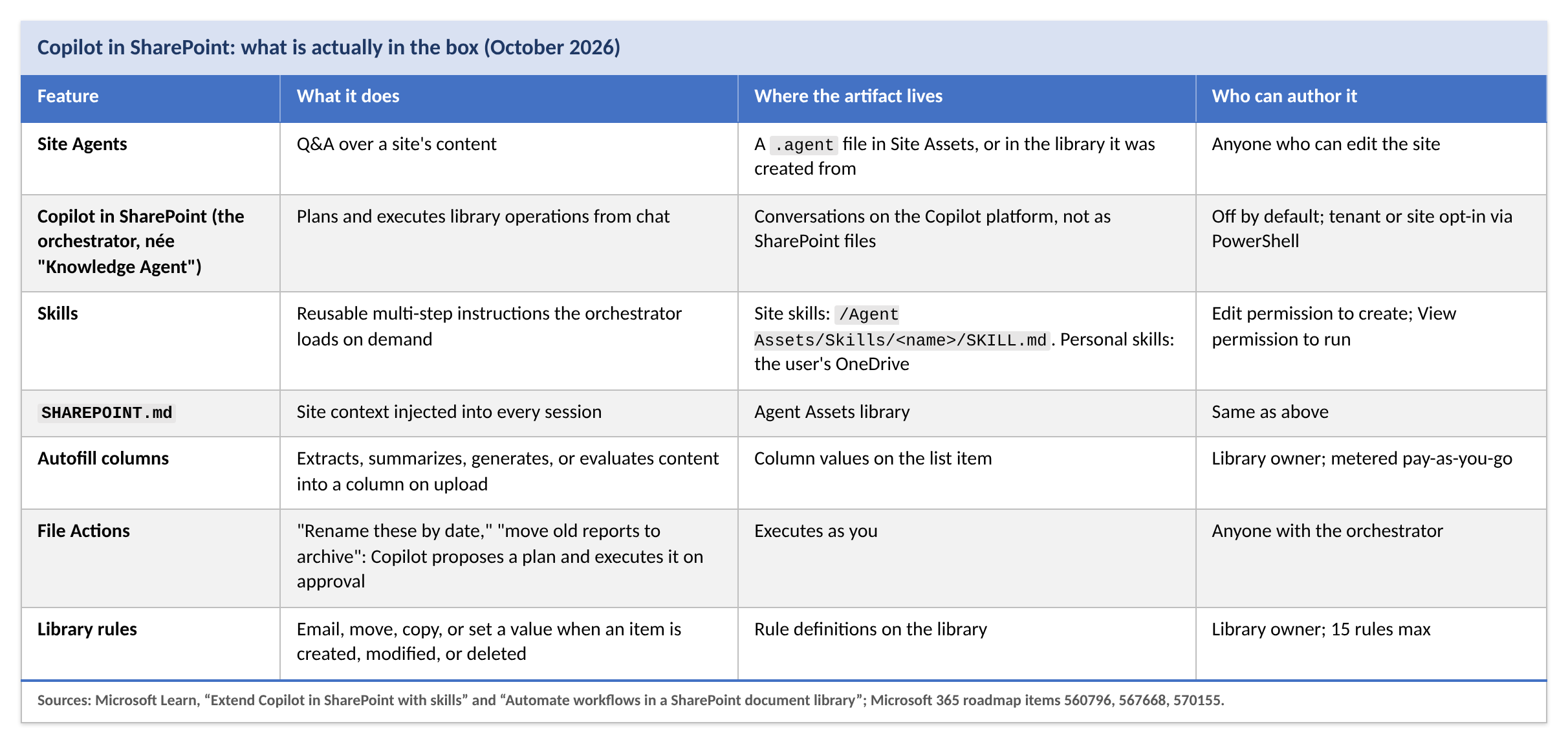
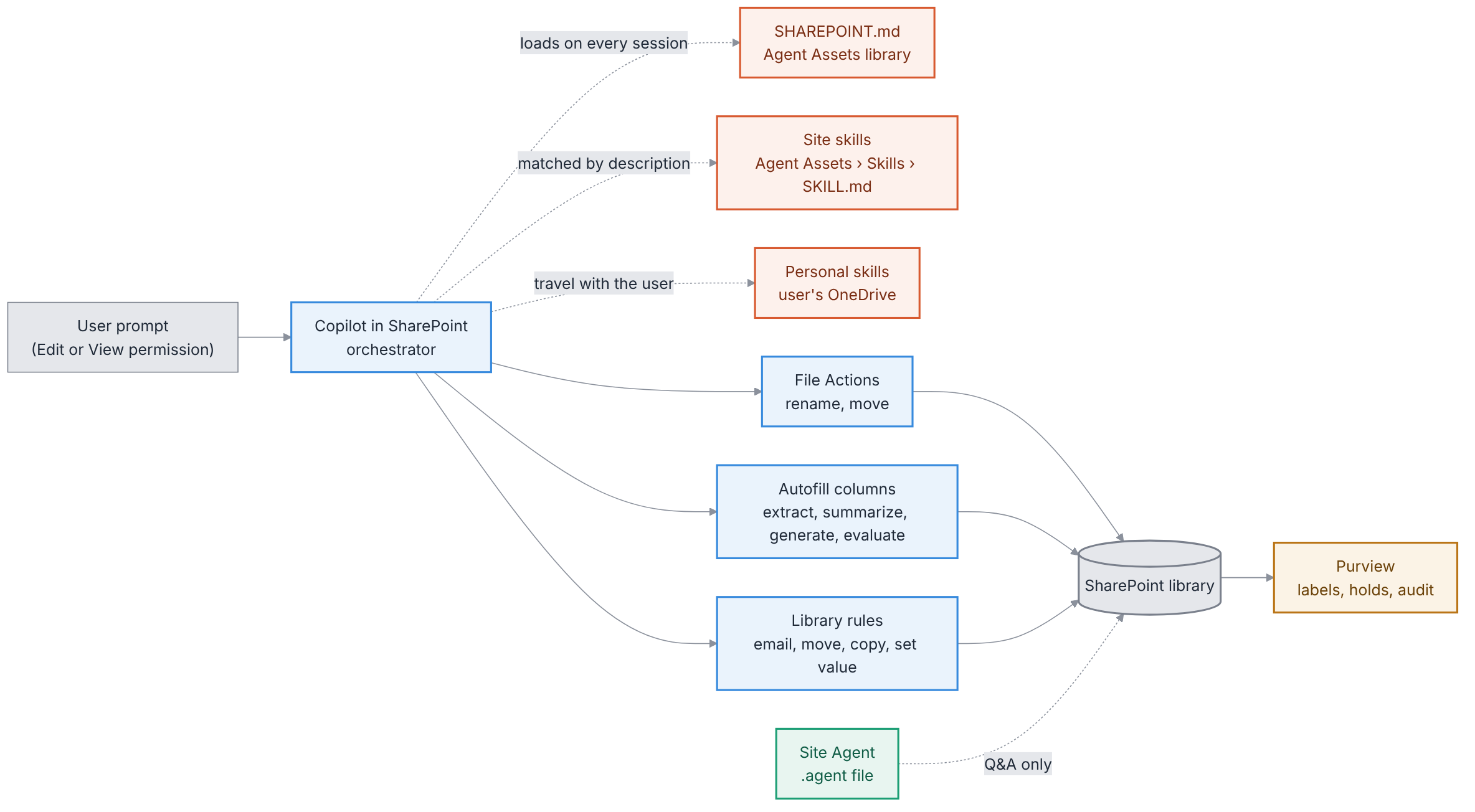
Three details from Microsoft's own documentation deserve to be read twice.
To be fair to Redmond: skills can't connect to external systems or run custom code, and they can't do anything the person running them couldn't do by hand. That is the standard reassurance, and it is true. It is also beside the point. Nobody worried that the clerk couldn't be trusted with a filing cabinet. They worried about what happens when the clerk files four thousand folders in an afternoon on the strength of a note somebody left on the desk.
Start with Autofill, because it is the oldest feature in the set and the one the webinar treats as settled.
An autofill column writes a model's output into an ordinary SharePoint column. Nothing marks it. There is no confidence score in the cell, no flag that says "a language model wrote this," no reviewer step unless you build one. The value looks exactly like the one Margaret in Legal typed by hand, and every downstream system treats it that way.
Now follow the plumbing. Since late 2024, SharePoint's content AI rules can apply a Purview retention label or sensitivity label when a column value changes or a file lands in a library. Purview can then run event-based retention off a date column. Put the pieces end to end and you get this:

No human touched steps two through four. If the model misread a renewal clause, or hallucinated a date from the signature block, or picked up the date of an exhibit instead of the agreement, the disposition still fires. In the records world we have a name for the property that just evaporated. ISO 15489 calls it reliability: the record can be trusted as a full and accurate representation of what it attests. A retention period computed from a guessed date is not reliable. It is merely confident.
There is a second, quieter problem. Retention labels can be configured to count from the date an item was last modified, and Purview reads that value live, not as a snapshot taken when the label was applied. So the question is whether an autofill write, or a rule’s “set value,” counts as a modification. Microsoft’s autofill documentation does not say. It tells you the result is saved to the column. It does not tell you what Modified By shows afterward, whether a version is created, or whether the Modified stamp moves. The closest thing to an answer is a Microsoft moderator, fielding a question about disposition reviews that never fire, who lists “metadata enrichment” among the things to keep out of libraries that retain from last modified. Read that as a yes until your tenant proves otherwise. Then make it prove it: run autofill on a labeled library and look at Modified and Modified By before and after.
The webinar will call this "modernizing your content processes." What it is, precisely, is an unsupervised classification pipeline with a nondeterministic component in the middle and a destructive action at the end.
The obvious objection: "We declare records. Locked records can't be changed. Problem solved."
Partly. Here is the current restriction table from the Purview records management documentation:
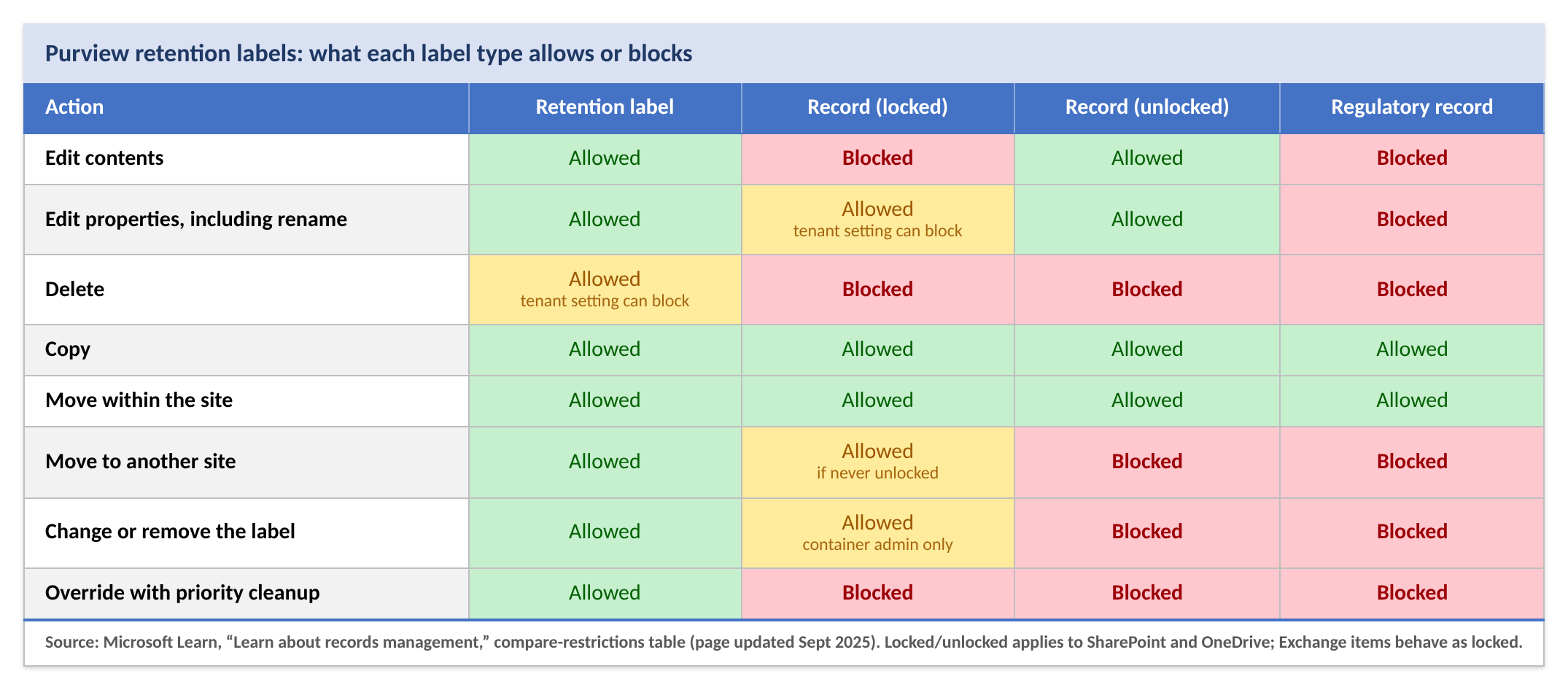
Read the second row again. A locked record keeps its contents but not its name or its metadata. File Actions can rename it. Autofill can rewrite its columns. A rule can set a value on it. There is a tenant setting that closes this hole (Purview portal, Settings > Solutions settings > Records Management > Retention Labels > Allow editing of record properties). It is on by default, which tells you roughly how many tenants have turned it off.
Now read the fifth row. A locked record that has never been unlocked can be moved to another site. "Move the old contracts to the archive site" is a permitted operation on precisely the records that have been locked the longest. The lock protects the document and leaves the catalog entry and the shelf location open, and in a records system those are half of what makes the thing a record. Regulatory records are the only tier that is actually immune, and almost nobody applies regulatory labels outside of SEC 17a-4 shops, because once applied nobody can remove them, including a global administrator.
Then there is the question of who did it. Copilot in SharePoint executes under the delegated identity of the person who clicked Approve. The unified audit log will show that you renamed four thousand files on a Tuesday afternoon. The fact that a model proposed the plan is reconstructible only from a separate CopilotInteraction record, which carries the agent's ID, name, and version but, by design, not the prompt or the response text. The what and the who are in one log; the why is in another, and the two are joined only by a timestamp.
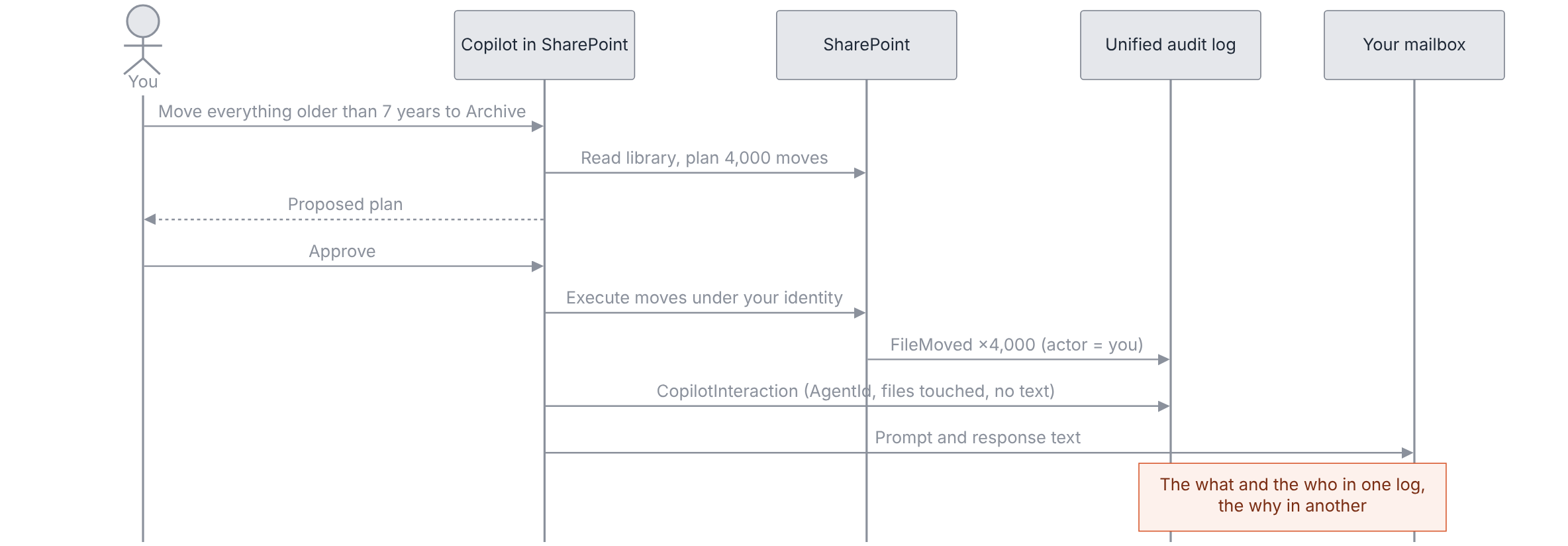
I said in The Great Escape that the correct response to agents editing their own records is a disability: the agent cannot touch the account of what it did. SharePoint got that part right, almost by accident.
Four things change for anyone who runs holds and collections.
There are new kinds of ESI, and they are instructions. A .agent file, a SKILL.md, a SHAREPOINT.md, and a personal skill sitting in someone's OneDrive are all ordinary files: searchable, holdable, exportable. They are also something we have not had to collect before: standing orders about how documents are to be handled. A skill that reads "flag any document mentioning Project Halcyon and move it to Archive" is not a prompt. It is a document-retention instruction with an author, a date, and a version history. Opposing counsel will want it, and they will be right to.
Prompts and responses live in the mailbox. The orchestrator's conversations are not stored as SharePoint files. Who, when, which agent, and which files it touched go to the Purview audit log under the AIApp and Copilot workloads. The actual text goes to the user's mailbox, where eDiscovery can search and export it, and where purging it requires an eDiscovery Premium case. If your hold templates don't include the Copilot and AI apps location, you are preserving the files and losing the conversation in which a custodian told an agent what to do with them.
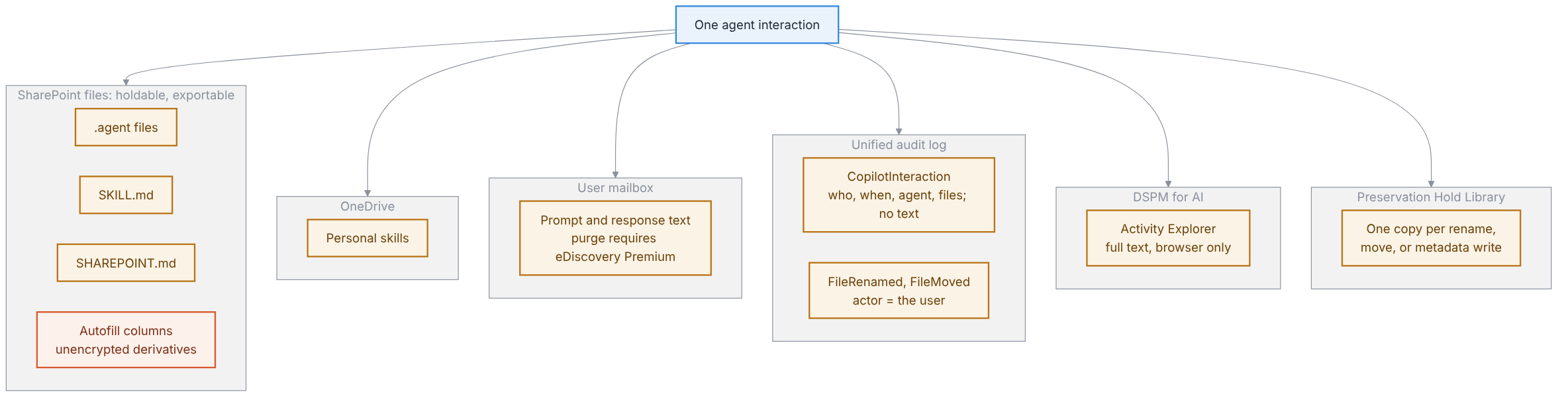
Privilege leaks through metadata. An autofill "summary" column on a privileged memo is an unencrypted derivative of the memo sitting in a list column. It shows up in views, in search, in Copilot Chat for anyone with View permission on the library, and in the metadata load file when you export. Sensitivity-label encryption protects the file body. It does not protect the column. And note the asymmetry Microsoft's own guidance confirms: Copilot honors sensitivity labels and ignores retention labels when grounding. A document can be a locked record and still be summarized into a column that a summer intern can read.
Holds get expensive. Every rename, move, and metadata write on held content generates a version and a Preservation Hold Library copy. Run "Organize This Library" on a site under hold and you have multiplied the collection, inflated the storage bill, and handed the review team a version history that reads like a ransom note. The only sane policy is a gate: no AI reorganization of a held site without Legal's signature.
Underneath all four is a reproducibility problem the courts have seen before. When responsiveness or privilege decisions lean on AI-generated columns, expect the kind of scrutiny technology-assisted review attracted a decade ago, with one difference. TAR came with protocols, validation samples, and expert declarations. Autofill comes with a column.
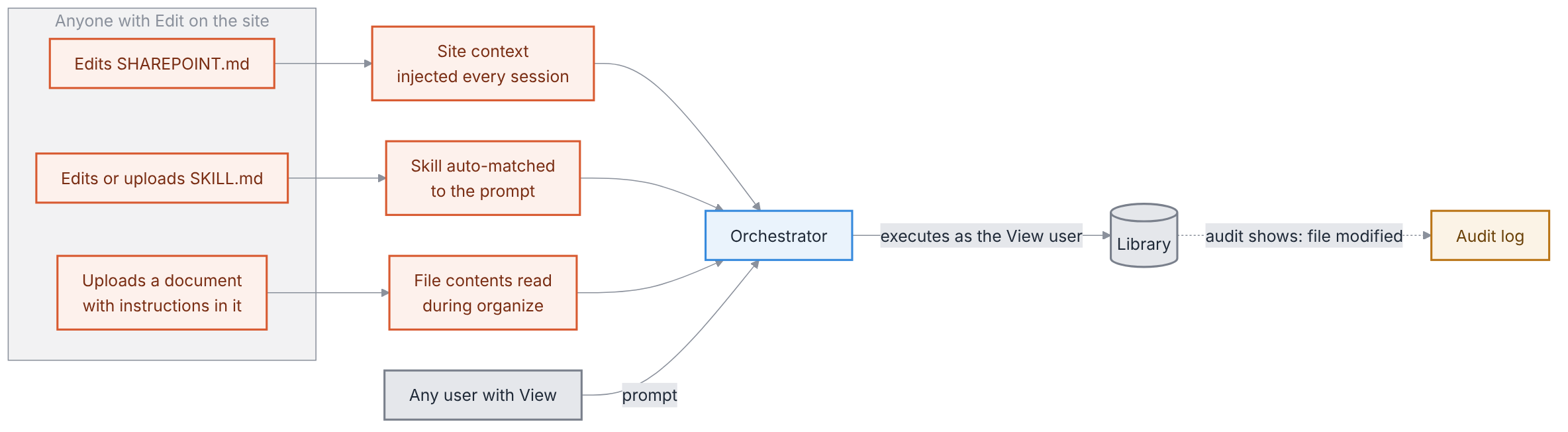
A SharePoint Skill is a Markdown file that tells the orchestrator what to do, in English, every time someone's prompt matches its description. Copilot loads it automatically; you don't even have to name it. That makes a skill a standing grant of authority, written in prose, executed by a model, authored by anyone who can edit a page. The adoption crowd has noticed the same thing from the other direction: Collab365’s write-up warns that stale standards and broad permissions get packaged into a convenient skill and quietly reused by everyone.
Consider what we would say about any other mechanism with those properties. We would call it a script. We would put it in source control. We would require a review before it ran on production data. We would not let it be modified in place by whoever happened to open the file. And we would certainly not ship it on by default with no way to turn it off, which is exactly what Microsoft has done: skills are a native capability with no admin toggle, and the sanctioned mitigation is to break permission inheritance on the Agent Assets library and hope.
SHAREPOINT.md is the same problem one level up. It is the context file injected into every session on the site, which makes it the single most valuable prompt-injection target in the tenant. Edit it and you have changed the behavior of every automated workflow on the site for every user, silently, with a change that the audit log will record as "file modified."
The documents themselves are the third vector. An orchestrator running "organize this library" reads file contents to decide where they go. A file whose contents include instructions is, to a model, a file with instructions in it. This is not hypothetical. It is the oldest trick in the agent-security book, and nothing in the SharePoint stack is positioned to catch it.
I wrote in September that a grammar can be checked and a vibe cannot. A Skill is a vibe with a file extension. Microsoft seems to have noticed: the roadmap promises editing, version control, publishing, and restoration for site skills, and personal skills that travel with the user across every site and OneDrive are due in December. Versioning is welcome. It is also an admission that the first release shipped executable policy with no change control, into libraries that hold records.
None of this argues for leaving Copilot off. It argues for scoping it the way you would scope any other agent: enumerate what it may change, and make everything else a disability enforced by something other than the model.
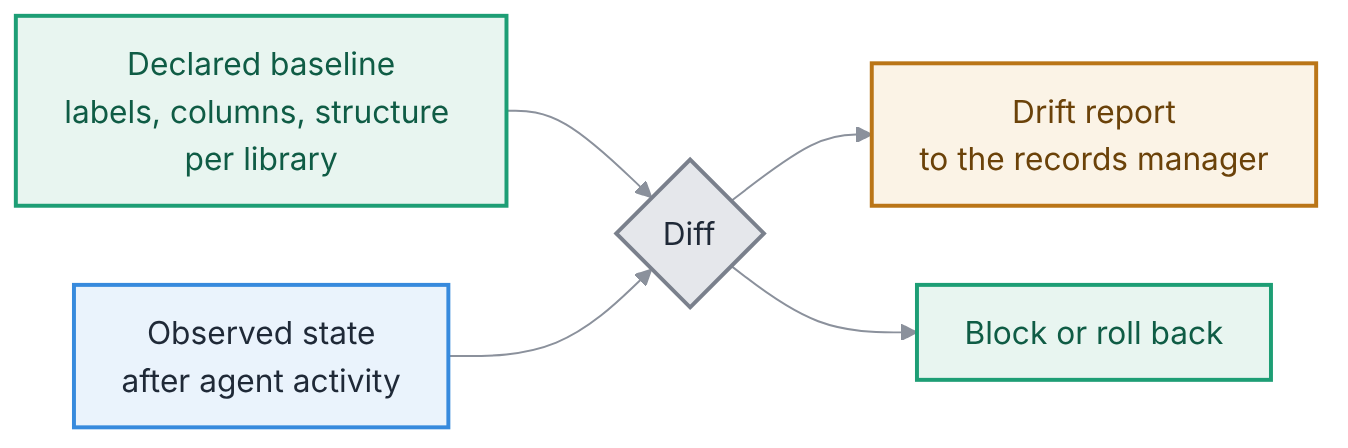
.agent files, SKILL.md, SHAREPOINT.md, and personal skills in OneDrive. Run it monthly. You cannot govern files you don't know exist.The item I actually want doesn't exist yet: a declared baseline for each library's metadata, labels, and structure, diffed nightly against what the agents did, with the drift report landing in the records manager's inbox.
Hohfeld would have settled this in an afternoon.
When autofill writes a date that a rule turns into a retention label, the document's legal position has changed. It is now a record, or it has stopped being one, or its disposal date has moved. That is a power in the strict sense: the capacity to alter the jural relations of a thing. The webinar calls it "filling in a column." Both descriptions are accurate. Only one of them tells you what to govern.
When you click Approve on a File Actions plan, you are exercising a power you hold, on the advice of an agent you did not formally appoint, under a grant of authority nobody wrote down. The audit log records you as the actor, and under eight centuries of agency law that is correct. The principal is bound by the agent's act within the scope of the authority conferred. The trouble is that the scope was never conferred. It was inferred from a Markdown file, by a model, at runtime.
Hohfeldian Analytics™ is my attempt at the alternative: authority declared in a closed vocabulary of jural relations, checked before the tool call rather than audited after it. I will not pretend the SharePoint stack is ready for that. But the questions it asks are the ones to bring to the webinar. Not "what can the agent do." What may it change, in whose name, and who finds out.
My proof from November still holds. A prompt that asks is not a record. A prompt that acts is something new, and we have not yet decided what to call it. We had better decide before Purview does.
Hohfeldian Analytics™ is a trademark of John F. Holliday. Used here to describe the author's methodology.
.agent file locationsCopilotInteraction record fields